Three Widgets I Built for the Vivaldi Dashboard
Three Widgets I Built for the Vivaldi Dashboard
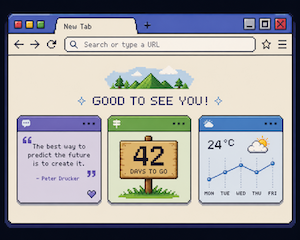
Vivaldi’s Dashboard takes Webpage widgets: a small web view pointing at any URL. No store, no install, no manifest, no review queue. If you can paste a link, you can add a widget.
That’s a low enough bar that I built three, out of things I already run.
How to add one
- Open a new tab to get the Start Page, then switch to Dashboard.
- Click Add Widget at the bottom.
- Pick Webpage.
- Paste the URL and click Done.
Two options worth knowing. Tick Share Theme Colors while adding, and the widget picks up your browser theme (Vivaldi 7.1 and up). And each widget has two sizes — Regular and Tall — switched from the ⋯ menu on the widget itself. All three below work at either size.
1. A Seth Godin quote a day
https://olekwrites.com/marrowminded/widgets/vivaldi
84 quotes from Seth’s Blog, one per calendar day. The day picks the quote, so it’s the same line for everyone and it turns over at midnight — no draw, no repeats until all 84 are used.
Each quote shows the title of the post it came from and links to the original. The quotes are baked into the page, so it makes no network call after loading and stores nothing. It came out of MarrowMinded, my reading app.
2. Days without missing a commit
https://olekwrites.com/lenny/YOUR-GITHUB-USERNAME/widget/vivaldi
My GitHub commit streak on the Simpsons “days without an accident” sign. Swap in your own username. Add ?from=2026-07-08 to count from a start date instead of your whole history — useful if you’re running a 100 days of code streak.
It’s the same badge as olekwrites.com/lenny, which you can also drop into a README.
3. GribGrab weather
https://gribgrab.com/widget
At Regular size: your location, current temperature, the sky icon and condition, and a row with feels-like, wind and precipitation. At Tall: all of that plus a scrolling hourly meteogram for the next 7 days — temperature, rain, pressure, wind, cloud cover.
The gear button opens location, units and language. Units and language are shared with the app, so you set them once. If you already use GribGrab, the widget reads the location you saved there and there’s nothing to configure.
One caveat: widgets can’t show permission prompts, so “use my location” only works if you already granted location to gribgrab.com in a normal tab.
What building them taught me
- Widgets are not kept alive. Vivaldi closes the page when the Dashboard closes and reloads it on every open. Cold start is the whole experience — paint from cache first, fetch after.
- The box is 394px wide and roughly 155px or 380px tall. Design for both, and never let the page scroll.
- No dialogs at all.
alert,confirmand permission prompts are disabled. Anything that needs a decision has to be an in-page overlay. - Theme variables only exist if the user ticks the box. Every
var(--colorBg)needs a fallback, or it looks broken for half your users.
Three URLs, three widgets, no install step. That part I like.
Happy dashboarding!
Thanks for reading! If you'd like to share your thoughts send me an email.